SEO and launch, so people find what you build.
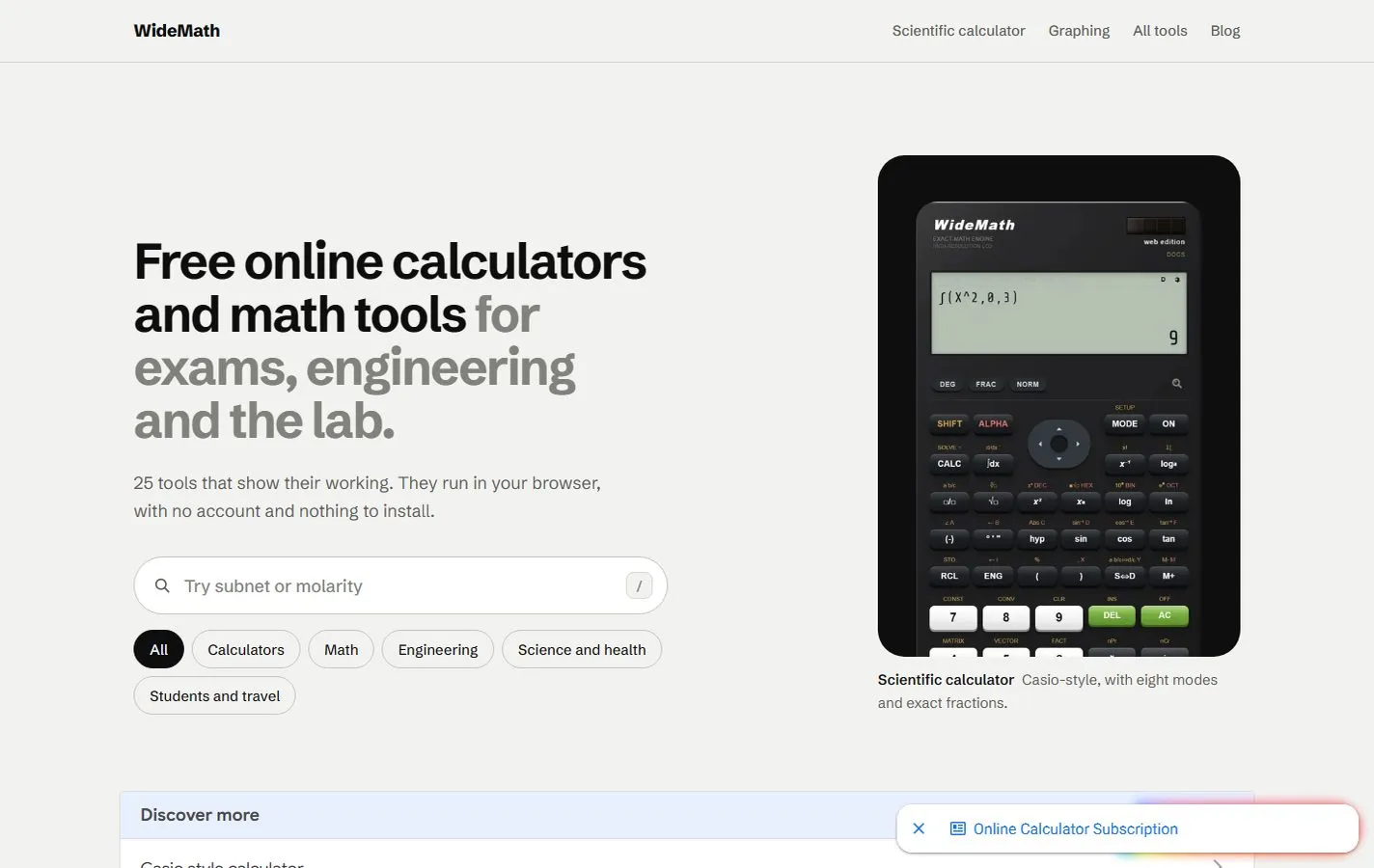
I get websites and apps found: technical SEO, content that answers real questions, structured data for Google and AI search, and store pages that turn visitors into installs. WideMath, a site we built at Appynox, had 19,464 sessions in one week (10 to 16 October 2026), 73% of them from Google search.
What you get
- Technical SEO: speed, titles, descriptions, structured data, sitemaps and redirects.
- Content that answers what your customers search for.
- Pages that ChatGPT, Perplexity and Google’s AI answers can read and cite.
- App store pages: titles, screenshots, feature graphics and store experiments.
- Launch videos and posts for launch week.
- Search Console and analytics set up, so you can see what works.
Work I have shipped

SEO, AI search and launch in detail
On this page
- What SEO services for small businesses include
- AI search optimization: how assistants decide what to say about you
- What this looked like on real sites
- Image SEO: a page for every photo
- App store optimization and launch videos
- Measuring with Google Search Console, Bing Webmaster Tools and analytics
- What I will not do
- What drives the cost of SEO services
- How to start
I offer SEO services for small businesses in two halves: the classic work of making a site easy for Google to read and for customers to trust, and AI search optimization, which helps ChatGPT, Perplexity and Google’s AI answers describe you correctly. For apps, the same job continues in the store page and the launch video. I never promise rankings or traffic, because nobody outside the search engines controls them.
What SEO services for small businesses include
Whether I am fixing a site as it is or working inside a website development build, the work has seven parts, and few businesses need all of them at once.
- Technical SEO makes a site fast, readable and clearly labelled for search engines.
- Content answers the questions your customers already ask.
- Local SEO helps nearby customers find a shop or a service-area business.
- AI search optimization helps ChatGPT and other assistants say accurate things about you.
- Image SEO helps your photos get found and credited to you.
- App store optimization helps an app’s listing be clear and easy to find.
- Launch videos and launch-week posts give a new site or app its first push.
Technical SEO
Technical SEO is the part visitors never see and search engines read first: fast pages on a phone, a title and description for every page, a sitemap, and redirects that send old addresses to the right new ones. I also add structured data, or schema markup, a short block of code that tells a search engine plainly what a page is: a business, a person, an article.
Content that answers real questions
Many small-business sites say a lot about the company and little about the customer’s problem, so I start from questions. You hear them in calls and WhatsApp messages, and Google Search Console shows the words people typed. A dentist’s most useful page might answer “What happens at a first visit?”
I use AI tools for drafting, but an unconstrained prompt returns the average of the internet. I hold the draft to your facts and your words, and you correct what only you know before anything goes live.
Local SEO
Local SEO starts with your Google Business Profile. Google says local results depend mainly on relevance, distance and prominence, so the profile needs the right categories, correct hours, real photos, and the same name, address and phone number as your website. Each location gets its own page with something specific to say, not one paragraph copied everywhere with only the suburb changed.
Most of my clients are in the US and I work from Kathmandu, so the owner completes Google’s verification of the profile. In Nepal, start with website and app development in Nepal.
AI search optimization: how assistants decide what to say about you
When someone asks ChatGPT, Perplexity or Google’s AI answers about a business or a person, the assistant reads a few pages and writes one answer instead of showing a list of links. Getting found in ChatGPT and other AI answers is sometimes called generative engine optimization, or GEO. Nobody outside those companies knows exactly how the choice is made, so I stick to what I can check.
Entities: one name, one photo, one description
Basically, an assistant is trying to work out which thing a name refers to: which company, which person, which place. These are called entities, and the assistant leans on what is repeated consistently across the web. When your name, photo, description and website address match everywhere, it can be fairly sure who you are. When someone with a similar name is easier to find, it can mix the two: one person’s description, another person’s photo.
So I pick one spelling of the name, one short description, one photo and one website address, and use them everywhere. On your site I mark them up as Organization or Person structured data, with a sameAs list that says which other profiles are also you.
My own case: ChatGPT and the wrong photo
This one is a little embarrassing, but it happened to me. ChatGPT showed a description of me next to a photo of someone else. My best guess, and it is only a guess because I cannot see inside ChatGPT, is that my old site had no clear photo of my face tied to my name, so the assistant took a picture from a page about someone with a similar name.
So I rebuilt this site to remove the doubt:
- My about page is the one profile page, marked up as the profile of a single person with my photo, a one-line description and links to my other profiles. Every page also says who I am and that I co-founded Appynox.
- My headshot is saved as anuj-paudel.jpg with the alt text “Anuj Paudel”. A share card, the image that shows when someone pastes a link into a chat, carries my face and my name.
- My other profiles get the same photo, the same one-line description and a link back here, with my surname spelled Paudel on every one.
After launch, the site tells Bing about its pages through IndexNow, explained below, because ChatGPT’s search is reported to draw partly on Bing. Then comes the step I take on any site: adding it to Google Search Console and Bing Webmaster Tools and submitting the sitemaps. Assistants refresh at their own pace, so I will ask the same question again later, and I will not call this fixed until the photo changes.
Pages that answer first
An assistant can only quote what it can read cleanly, so I write the first paragraph of a page to stand on its own: who you are, what you do, where, and for whom.
Take opening hours. If they exist only in a photo of a printed menu, a system that reads text sees nothing. I put the facts in the page text and link claims to their sources, so a careful reader, or a careful assistant, can check them.
llms.txt, AI crawlers and IndexNow
An llms.txt file is a plain text file at the root of a site that lists its most useful pages, each with a one-line description. This site has one. It is only a proposal, and as far as I know the big AI companies have not said they rely on it, so I treat it as a cheap extra.
Crawlers matter more. GPTBot collects training data for OpenAI, OAI-SearchBot finds pages for ChatGPT search, PerplexityBot does that job for Perplexity, and Bingbot feeds Bing, which Microsoft’s Copilot uses.
Many sites block some of them by accident, through an old robots.txt rule or a bot-protection setting nobody revisited. I check that the bots that find answers can get in. Whether the training bots may come in is your call.
IndexNow lets a site tell Bing and a few other engines the moment a page is added, changed or removed, instead of waiting for a crawler. As far as I know Google does not use it, so Google still learns through the sitemap and Search Console.
None of this guarantees a mention. Answers differ between people and between days, and I can only remove the avoidable reasons for being wrong or missing.
What this looked like on real sites
WideMath: tools that people search for
WideMath, which we built at Appynox, is a set of 25 free browser math tools, including a Casio-style scientific calculator in 15 languages. In one week, 10 to 16 October 2026, it had 19,464 sessions, and 73% of them came from Google search. Please do not read that as a number to expect, because a calculator answers a question many people type and a local service has far fewer searchers.
Feed Philly Coalition: fixing a site that already exists
The Feed Philly Coalition website, built in February 2025, had an overhaul in August 2026. Every page got its own title and description. Structured data now describes the organisation and its articles. The buttons meet contrast standards, the home page loads a fifth of the JavaScript it did, and generated images on the main pages became real photos.
I am listed as the coalition’s technical lead. I have no before-and-after traffic figure to quote, so I will not make one up.
harryhayman.com: a big archive and old links
harryhayman.com is a website project built around a blog of 336 articles. The search work was a unique title and description for each page, structured data for the site’s owner, his organisations and every post, a share image for each article, and redirects for old links.
A redirect sends visitors and search engines from a moved page to its new address, so links people saved long ago keep working. This site does it too, for its old /films and /graphics pages.
NEB GPA Calculator: demand that follows a calendar
The NEB GPA Calculator, a free tool I built for Nepal’s Grade 11 and 12 students, has no ads and no accounts. Its Search Console graph spikes on results days. If your customers need you on a fixed date, such as a tax deadline, the page has to be live, indexed and fast before it.
Image SEO: a page for every photo
Photos reach people through image search, through the pictures beside an AI answer, and through every link pasted into a chat. This site’s gallery is the working example.
- Every photo has its own page, with a title, a caption and a longer description, so a search engine has text to read as well as pixels.
- Alt text is a real sentence about what is in the picture, written first for someone using a screen reader.
- Credit data sits inside the image file itself: my name as the creator, a copyright line and a link to the licence terms, so the credit can travel if someone saves the picture.
- An image sitemap lists every photo page with its image, so crawlers do not depend on following links.
For a business, the same idea means real photos of your shop and your team at work, named and described this carefully. The wrong-photo problem above was partly an image SEO problem too: a clear file name, alt text and credit help an assistant match a face to a name.
App store optimization and launch videos
People search inside Google Play and the App Store, and the store picks listings by reading what you wrote and watching how people react. App store optimization, or ASO, makes a listing clear and easy to find. If the app still has to be built, that is app development.
Store pages
Google Play reads the title, the short description and the full description, so those carry the words people search for, written as normal sentences. Apple’s App Store leans on the name, the subtitle and a hidden keyword field more than on the long description.
Screenshots and the feature graphic, the wide banner image on a Google Play listing, do as much work as the text, because a visitor sees the first few without scrolling. I built my own tool to compose store screenshots, so changing a caption does not mean redrawing every image. The art itself is graphic design work.
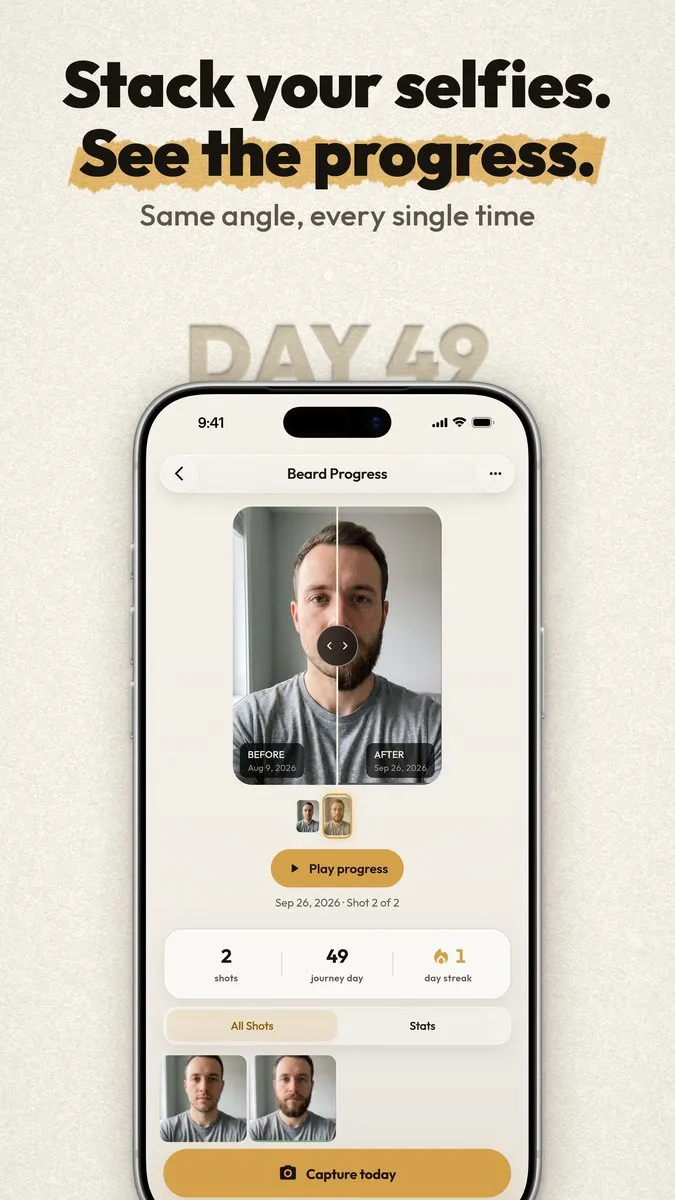
You can test a listing instead of guessing. Google Play’s store listing experiments and Apple’s product page optimization show each version to a share of visitors and report which earns more installs, so visitors choose the winner instead of the team. SameShot, the progress-photo camera we built at Appynox, has two complete store looks, one light and one dark, built for this kind of test.
The app has to deserve the listing, so before it ships I hold it to limits on memory, frame time and cold start, because crashes and slow starts turn into poor reviews. After release I read the reviews and carry what they say into the next update.
Launch videos
A launch video is the one short film that explains the product. The SameShot one runs 52 seconds. It gets used in several places, such as the store page, the website and launch-week posts, and each wants its own cut: vertical for phones, wider for a website, with captions because many people watch without sound.
Appynox also made 85 social videos for SameShot and 65 shorts for WideMath, as video at volume describes, and AI video editing covers how I edit.
Measuring with Google Search Console, Bing Webmaster Tools and analytics
Three kinds of tool do most of the measuring, and I set them up in your name so the data stays yours.
- Google Search Console shows which searches showed your pages, how often they were clicked, and which pages Google has indexed.
- Bing Webmaster Tools shows the same for Bing, which also feeds some AI assistants.
- Analytics shows what visitors do after they arrive and whether they called, booked or filled in a form. For apps, Google Play Console and App Store Connect play this role.
What to watch depends on the stage.
- Right after launch or a big change, check indexing. Are the new pages in Google and Bing, and is anything blocked by mistake?
- Once pages are indexed, look at impressions and queries. A page that is shown often and clicked rarely needs a better title and description.
- Then look at clicks and what follows them, such as calls and bookings. Traffic that does not convert usually points to the page or the offer.
- For AI answers there is no dashboard. I keep a list of the questions that matter, ask ChatGPT, Perplexity and Google, save the answers and compare them over time, and I fix the page behind each wrong one. Visits from assistants usually show up in analytics as referrals from sites such as chatgpt.com.
Compare like with like: the NEB calculator’s results-day spikes show how a busy week set beside a quiet one misleads. Search Console clicks and analytics sessions will not match exactly: they count different things. While a change is new it is worth checking every week, and less often once it settles.
What I will not do
- I do not buy links or join link exchanges. Google treats that as link spam.
- I do not stuff keywords. A page that repeats a phrase until it reads badly loses the reader first.
- I do not promise rankings, positions or traffic. Anyone who guarantees a position is usually choosing very easy searches or leaving something out.
- I do not mass-produce thin pages to catch searches, however they are written.
- I do not write or buy reviews, or invent testimonials, statistics or sources.
- I do not take over your accounts. Search Console, analytics and your Google Business Profile stay in your name, and nothing goes live without your approval.
What drives the cost of SEO services
I do not list prices, because “SEO” can mean very different jobs. After a call I put the plan and the quote in writing. These things move it:
- The size and condition of the site. A few clean pages need little technical work, while an older site with broken redirects, or a 336-article archive such as harryhayman.com, needs far more.
- How much content has to be written or rewritten, and how much of it depends on facts only you can supply.
- How crowded the results are for your questions. I look at who already answers them and tell you if the odds look poor.
- Languages and locations. A calculator in 15 languages means 15 versions to get right, and each branch of a business needs its own profile and page.
- For apps, the number of stores, languages and screenshot sets, and how many launch videos you want.
- Whether the work is a one-time setup or ongoing, and whether the site needs rebuilding first.
How to start
The easiest way is to book a 30-minute call. Bring your website address, or your app’s store link, and the three questions you would most like an assistant to answer about you.
On the call I look at what Google and the assistants say about you today and tell you what to fix first, and what is not worth fixing.
How it works
Audit
What search engines see today, and what is holding the site back.
Fix the foundations
Speed, structure, titles, structured data and redirects.
Publish and launch
Content that answers real questions, store pages and launch-week posts.
Measure and adjust
Search Console and analytics show what works; we do more of it.
Straight answers
How long does SEO take?
Fixes to speed and structure count as soon as search engines crawl the site again. Rankings from new content usually take months, and I will not promise a position.
What does ready for AI search mean?
Pages that AI tools can read and quote: a clear answer near the top, structured data, facts with dates, and nothing important hidden inside images.
Can you help with app store pages?
Yes: listing copy, screenshots and feature graphics. For SameShot we made two complete store looks so they can be tested against each other.
Do you write the content?
Yes, or I edit yours. Every claim is checked, and nothing is made up.
Bigger build?
Appynox, the AI-first agency I co-founded, takes on full projects with a team of three.
Visit appynox.comTell me what eats your week.
Book a 30-minute call. I ask about the work, tell you honestly what is worth automating or building, and send a written plan and a quote.
Referred by someone? Mention them when you book.